You're alone in a hotel room after midnight, and every knock could be your last. The Keep the Door Locked security cameras are your only window into what's waiting outside, so knowing what they reveal and how to read the footage is the difference between surviving the night and becoming another cautionary tale. When strangers knock and claim they need help, the camera feed is the one tool you can trust — provided you actually know how to use it.
The game, developed by Hotel Room Services (KivC) and launched on Roblox on May 28, 2026, has already pulled in 4.3 million visits with over 10,000 players online at peak times. That player base has spent countless hours mapping out every camera angle, every static glitch, and every anomaly tell. This guide compiles what the community has learned about the surveillance system so you can stop guessing and start surviving.
Interpreting What the Cameras Show You
The camera system in this game is more than a simple security feed — it's a full investigative toolkit that reveals critical information about every visitor before you decide whether to unlock the door. When you pull up the monitor, you see what the Keep the Door Locked cameras capture in real time, which means you're watching the hallway and exterior as they happen rather than relying on audio cues alone.
Understanding the camera layout is your first priority because each angle serves a different purpose. The hallway camera gives you a straight view of anyone approaching, while the exterior camera watches the parking lot and street entrance. Some rooms also have a side-corridor camera that catches visitors trying to sneak around through alternate routes, which is exactly where the game's anomalies tend to appear.
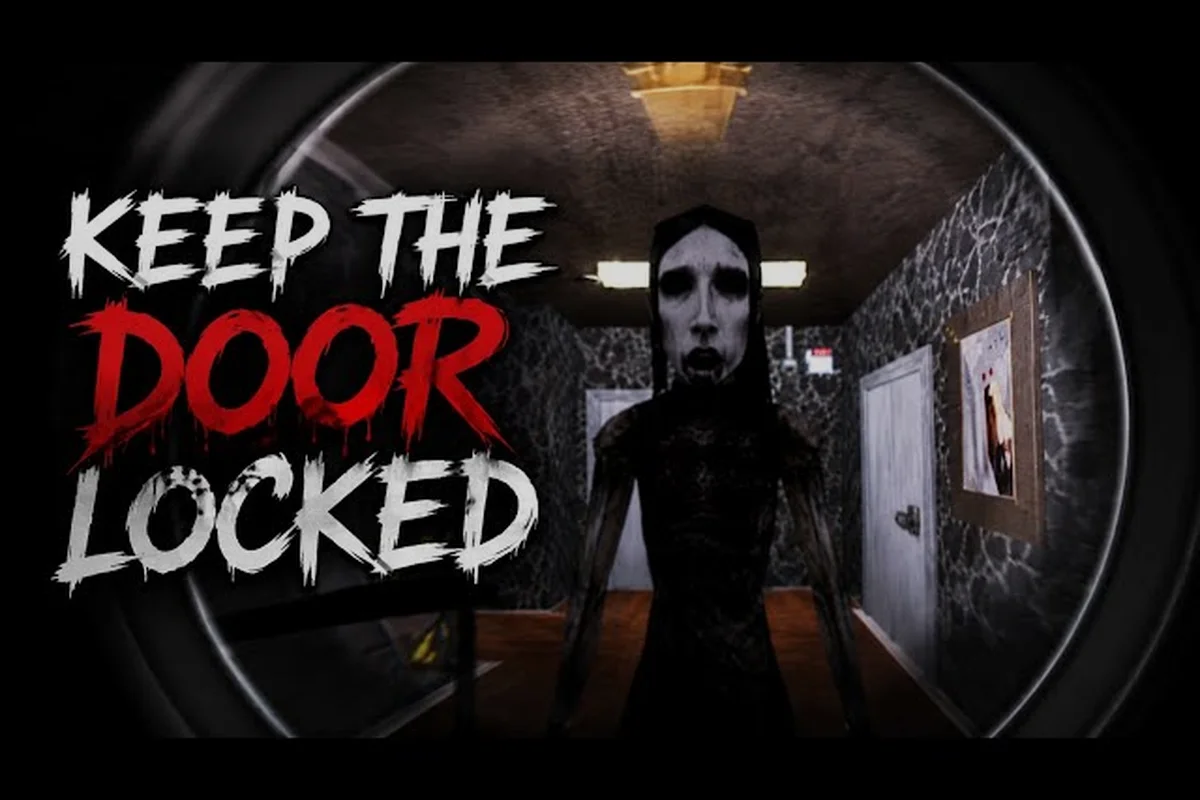
Here's what the Keep the Door Locked cameras reveal in a typical night: a quiet, dimly lit hallway that slowly shifts into a nerve-wracking watch. Players rely on these feeds to track the entity’s movements, often spotting its shadow just before it rounds a corner. Timing your door checks with the camera flicker is key to survival.
-
Visitor appearance and body language — whether they look nervous, confident, or outright hostile
-
What they're carrying — some visitors hold items that should raise immediate red flags
-
Whether they're alone — groups of two or more change your approach entirely
-
Movement patterns — anomalies often move unnaturally or pause in ways humans don't
-
Environmental details — blood trails, displaced objects, or doors that shouldn't be open
The critical limitation is that cameras don't show everything at once, which is why you need to understand the cycling mechanic before you rely on the feed during a knock. If you want the full breakdown of how the monitor interface works, check our Keep the Door Locked camera system guide for the technical details on feed resolution and refresh rates.
Reading Security Camera-Exclusive Tells
The most valuable skill you can develop is spotting camera-only tells — anomalies that are visible exclusively through the Keep the Door Locked CCTV feed and would be completely invisible if you opened the door without checking. Community testing has confirmed several consistent patterns that appear across different rooms and difficulty levels, and veteran players report that these tells are the most reliable way to identify threats before they're standing in your doorway.
| Camera Tell | What It Looks Like | Threat Level |
|---|---|---|
| Face pressed to lens | A face fills the entire frame, distorted | Extreme |
| Missing evidence | Items vanish between camera cycles | High |
| Night-vision figure | Shape visible only in infrared mode | High |
| Static burst | Feed glitches exactly when someone knocks | Medium |
| Double reflection | Two reflections in a single window pane | Medium |
These tells don't always mean immediate danger, but they're consistent indicators that something isn't human. According to player reports from the official Roblox page, the face-pressed-to-lens tell appears in roughly 70% of anomaly encounters, making it the single most common warning sign you'll see all night.
Efficient Camera Cycling Routines
Cycling through the Keep the Door Locked all cameras view isn't just about pressing a button — it's about developing a rhythm that maximizes your information intake while minimizing the time you spend staring at a screen instead of listening for knocks. The game gives you multiple camera feeds, and knowing when to switch between them is a skill that takes practice to develop.
The core mechanic is straightforward: you can cycle through each camera view in sequence, and some setups let you toggle between normal and night-vision modes for each angle. The problem is that cycling takes time, and anomalies can move between camera views while you're watching a different feed entirely.
| Camera | Best Used For | Switch When |
|---|---|---|
| Hallway | Tracking approaching visitors | They exit frame or knock |
| Exterior | Monitoring parking lot arrivals | Someone lingers too long |
| Side corridor | Catching flanking anomalies | You hear movement nearby |
| Night vision | Spotting hidden figures | Standard view shows nothing |
The optimal cycling pattern reported by experienced players is a figure-eight loop: hallway to exterior, exterior to side corridor, side corridor back to hallway. This covers all approaches in roughly three to four seconds of camera time, which is fast enough to catch most anomalies before they reach your door while still leaving you time to react.
For the precise button mapping and control schemes across PC and mobile, our Keep the Door Locked camera controls guide breaks down every input option so you can find what works best for your setup. This includes toggling between mouse-look and touch-drag sensitivity, which many players tweak to avoid panicked camera swings during a chase. Understanding these inputs beforehand can mean the difference between spotting the intruder early or fumbling at the worst moment.
Monitoring the Hall in Night Vision and Infrared
Night vision is where the Keep the Door Locked cameras reveal their most important secrets, because several anomaly types are invisible in standard light but show up clearly in infrared. The game's night-vision toggle switches your feed to a green-tinted view that picks up heat signatures, and this is often the only way to spot certain threats.
The infrared mode is particularly useful during blackout events, when the hotel's power flickers and standard camera feeds go dark. Players report that these blackout periods are when anomalies are most active, which means switching to night vision during these events isn't optional — it's survival critical.
-
Heat signatures behind walls — some anomalies hide in adjacent rooms
-
Faint figures in otherwise empty hallways — the classic "barely there" tell
-
Distorted heat patterns — anomalies often have irregular thermal signatures
-
Objects that shouldn't emit heat — a chair that's warm means someone touched it recently
The tradeoff is that night vision reduces your visual clarity, making it harder to read facial expressions or identify specific visitors. You'll need to alternate between modes based on what you're trying to learn from the feed. For example, when a suspect lingers near the door, switching to standard view can reveal subtle hand movements, while night vision helps track them through dark hallways—just remember that each toggle costs precious seconds during a chase.
Keep the Door Locked What Cameras See vs. What They Miss
The Keep the Door Locked what cameras see question has a deceptively simple answer: they see everything in their field of view, but they miss everything outside it. That blind-spot limitation is where the game generates most of its scares, because anomalies are specifically designed to exploit the gaps in your surveillance coverage.
Understanding the coverage map of your room is essential. Each camera has a fixed field of view, and while the angles are designed to cover the main approach routes, there are dead zones where visitors can stand without being visible. Anomalies that know these dead zones will use them to their advantage, which means a clean camera feed doesn't always mean a safe hallway.
| What Cameras See | What Cameras Miss |
|---|---|
| Direct approach from hallway | Visitors pressed against walls beside the door |
| Parking lot activity | Figures lurking under the camera itself |
| Side corridor movement | Anyone crouching below the camera's tilt angle |
| Thermal signatures | Visual details in complete darkness |
| Movement at distance | Faces obscured by hats, hoods, or masks |
The most dangerous blind spot is directly below each camera. Because the cameras are mounted high on the wall, they can't see anyone standing immediately beneath them, and some anomalies are programmed to take advantage of this exact positioning. Players report that anomalies will sometimes stand in this dead zone and wait, knowing you can't see them until you open the door.
This is why the community mantra is consistent: always check the cameras before opening the door, but never assume a clear feed means a clear hallway. The cameras are a tool, not a guarantee. A single static frame can hide a lurking figure just outside the lens, and players who rush to the exit after a quick glance often find themselves caught in the very trap they tried to avoid.
Balancing Camera Time with Door Listening
There's a constant tension in this game between watching the cameras and listening for audio cues, because you can't effectively do both at the same time. The camera monitor blocks out most ambient sound, which means you might miss knocking, footsteps, or the subtle auditory tells that indicate a visitor's true nature.
Players have developed a check-and-listen rhythm that balances both information sources, alternating quick peeks through the door with attentive pauses to catch audio cues. This cadence minimizes exposure time while maximizing awareness, letting you track the entity’s approach without committing to a full visual sweep. Experienced players often pair this with a fixed spot near the door, ensuring they can react instantly to either a sound spike or a shadow shift.
-
Check cameras every 10-15 seconds during quiet periods
-
Lock onto the hallway camera when someone approaches
-
Switch to audio focus once a visitor reaches the door area
-
Use the exterior camera for rapid confirmation before answering
The numbers matter here: community testing suggests that visitors spend an average of 8-12 seconds walking from the parking lot to your door, which gives you time for roughly two full camera cycles before they knock. Using that window effectively is the difference between identifying a threat and being caught off guard.
Keep the Door Locked Check Cameras Before Door: Survival Protocol
The Keep the Door Locked check cameras before door rule is the single most repeated piece of advice in the game's community, and for good reason — it's the most reliable survival habit you can develop. Every experienced player has a story about a death that could have been prevented by spending two extra seconds looking at the monitor, and these stories have shaped the community's approach to every knock.
The protocol goes beyond just glancing at the feed. It's a structured sequence that veteran players follow every single time, because consistency is what saves you when an anomaly is particularly good at hiding. This means checking each camera in a fixed order, pausing on blind spots, and never skipping the audio cue check—a single missed second can let the entity slip past your lockdown.
| Step | Action | Duration |
|---|---|---|
| 1 | Cycle through all cameras quickly | 2-3 seconds |
| 2 | Focus on the hallway camera | 1-2 seconds |
| 3 | Toggle night vision if the feed is dark | 1 second |
| 4 | Check for camera-only tells | 2-3 seconds |
| 5 | Make your decision and act | 1 second |
This 7-10 second protocol is fast enough to fire off before every knock response, and it dramatically reduces your death rate because it catches the most common anomaly tells. If you're just starting out, our Keep the Door Locked how to use cameras guide walks through the exact steps for pulling up the feed and running this check on any device.
The Watcher's Checklist
Once you've internalized the basic protocol, you can graduate to the watcher's checklist that advanced players use. This expanded version covers edge cases and unusual situations that the basic protocol might miss, and it's what separates players who survive multiple nights from those who get caught in their first hour.
-
Check for missing evidence — compare what you saw in the previous cycle to what's there now
-
Watch for camera static — a static burst during a knock is almost always a warning
-
Look for double reflections — reflections that don't match the environment indicate an anomaly
-
Verify visitor count — if you saw two people but one is now missing, that's a problem
-
Time the approach — visitors who take longer than 15 seconds to reach the door are suspicious
The watch the cameras mantra isn't just about the moment of the knock — it's about maintaining situational awareness throughout the entire night. Players who periodically check the feeds even when nothing is happening are the ones who notice anomalies before they become threats, because they've established a baseline of what normal looks like.
Camera Strategy for Different Visitor Types
Not all visitors require the same camera strategy, and adapting your approach based on what you see on the Keep the Door Locked CCTV feed is the mark of a skilled player. Some visitors are genuinely in need, while others are traps waiting to spring, and the camera gives you the information you need to tell them apart.
The visitor classification system that players have developed categorizes everyone who approaches based on camera-visible characteristics. This isn't an official game mechanic, but it's a community-developed framework that organizes what the cameras reveal into actionable categories. By assigning labels like "hesitant" or "direct," players quickly decide whether to hold the door or prepare for a breach, turning raw visual cues into split-second survival tactics.
| Visitor Type | Camera Indicators | Recommended Response |
|---|---|---|
| Legitimate guest | Normal movement, visible face, consistent story | Open after verbal confirmation |
| Suspicious visitor | Nervous movements, avoiding camera, unclear story | Ask questions through door |
| Clear anomaly | Camera tells present, distorted appearance | Do not open, ignore knocking |
| Group visitors | Multiple people, coordinated approach | Extra caution, verify each person |
| Silent figure | No audio cues, appears suddenly in frame | Do not open, monitor cameras |
The key insight from community walkthroughs, including TheKacperosEN's full anomaly playthrough, is that camera behavior is consistent across visitor types. Legitimate guests look at the camera naturally, while anomalies either avoid it or stare directly into it. The ones who stare are almost always threats, because the game's design punishes players who don't notice that tell.
When to Trust the Cameras Over Your Instincts
There are moments when the Keep the Door Locked cameras show you something that contradicts what you feel or hear, and knowing which source to trust is a critical decision point. Sometimes the cameras are right and your instincts are wrong, and sometimes it's the opposite.
The community consensus is that cameras are more reliable than audio cues for identifying threats, because audio can be faked by anomalies. The game's design includes anomalies that knock perfectly, sound desperate, or mimic known voices — but the camera feed is harder to spoof. When what you hear doesn't match what you see, trust the cameras.
That said, the cameras have their own failure modes. Camera static can obscure a tell, night vision can create false positives, and dead zones mean some information is simply unavailable. The best players develop a weighted decision-making process that combines camera data with audio cues and their own experience, and they adjust those weights based on what the game throws at them.
Advanced Detection via the Security Cameras
The Keep the Door Locked cameras explained section of this guide covers the advanced detection techniques that go beyond basic tell recognition. These are the strategies that experienced players use to identify anomalies that are specifically designed to fool the camera system, and they require careful attention to detail.
One of the most important advanced techniques is baseline comparison. The idea is simple: you establish what normal looks like in the first few minutes of your shift, then you compare every subsequent camera view against that baseline. Anomalies are designed to blend in, but they always introduce some inconsistency into the environment — a shifted object, a different shadow, an extra reflection.
| Detection Technique | How It Works | Difficulty |
|---|---|---|
| Baseline comparison | Track normal state, spot deviations | Easy |
| Movement pattern analysis | Compare visitor movement to human norms | Medium |
| Reflection verification | Check if reflections match reality | Medium |
| Timing analysis | Track how long visitors spend in frame | Advanced |
| Cross-camera tracking | Follow visitors between camera views | Advanced |
The most powerful advanced technique is cross-camera tracking, which involves following a visitor through the Keep the Door Locked all cameras view to see if they move consistently between feeds. Anomalies often glitch during camera transitions — they might disappear from one view and appear in another faster than physically possible, or they might change appearance between angles.
According to data from Josh Plays' complete walkthrough, cross-camera inconsistencies are present in roughly 85% of anomaly encounters, making this the most reliable advanced detection method available. It takes practice to execute because you need to track a visitor while simultaneously cycling cameras, but the payoff is significant.
Anomaly-Specific Camera Patterns
Different anomaly types show different patterns on the Keep the Door Locked cameras, and learning to recognize these patterns is like building a recognition library in your head. Each anomaly type has tells that are unique to it, and identifying the type early lets you predict what it will do next.
Players have documented several anomaly-specific camera signatures: each entity distorts the feed in a unique way, from static flickers to subtle color shifts. Recognizing these tells early is crucial, as reacting too late often triggers a fatal jump-scare. Veterans recommend memorizing the grainy overlay pattern to buy precious seconds before locking the door.
-
The Face Presser — presses its face against the camera lens, causing distortion
-
The Vanisher — appears in one camera view but not the next, despite no movement
-
The Mirror — shows up in reflections but not in direct view
-
The Statue — stands perfectly still for minutes, then moves when not observed
-
The Duplicator — appears as two figures that move in perfect sync
The Vanisher pattern is particularly dangerous because it exploits the cycling mechanic — it moves while you're looking at another camera, and it's gone by the time you cycle back. The only reliable counter is to cycle faster or to use the exterior camera to track its exit route.
Frequently Asked Questions
What do the Keep the Door Locked security cameras actually show?
The cameras show real-time feeds of the hallway, exterior, and side corridor areas around your hotel room. They reveal visitor appearance, movement patterns, carried items, and environmental details. Most importantly, they display camera-only tells like faces pressed to the lens or figures visible only in night vision, which are critical for identifying anomalies before you open the door.
How fast should I cycle through the cameras?
The optimal cycle time is roughly three to four seconds for a complete loop through all camera views. This speed lets you maintain awareness of all approach routes while still leaving time to react when a visitor reaches your door. Slower cycling creates blind spots that anomalies exploit, while faster cycling makes it hard to process what you're seeing.
Can anomalies hide from the cameras?
Yes, anomalies can hide from the cameras, primarily by exploiting the dead zone directly beneath each camera’s mounting position. Cameras also have limited fields of view, so visitors can stand entirely outside their angle. A clear feed therefore doesn’t guarantee safety, which is why combining camera checks with audio awareness is always advised.
Is night vision worth using when it's not a blackout?
Night vision is valuable even in well-lit conditions because it reveals thermal signatures that are invisible in standard view. Some anomalies only appear in infrared, so toggling night vision periodically during your camera cycles can catch threats you would otherwise miss. The tradeoff is reduced visual clarity, so alternate between modes based on what you need to see.
What's the most common camera tell I should watch for?
The face pressed to the lens is the most common camera-only tell, appearing in roughly 70% of anomaly encounters according to community data. It's also one of the easiest to spot because it distorts the entire camera frame. Other common tells include missing evidence, static bursts during knocks, and figures that appear only in night vision mode.